Modiface Haircut:Hair Makeover
- 3.9
- Rating
- 1.00M
- Installs
- Free
- Price
 Analysis by App-foxy
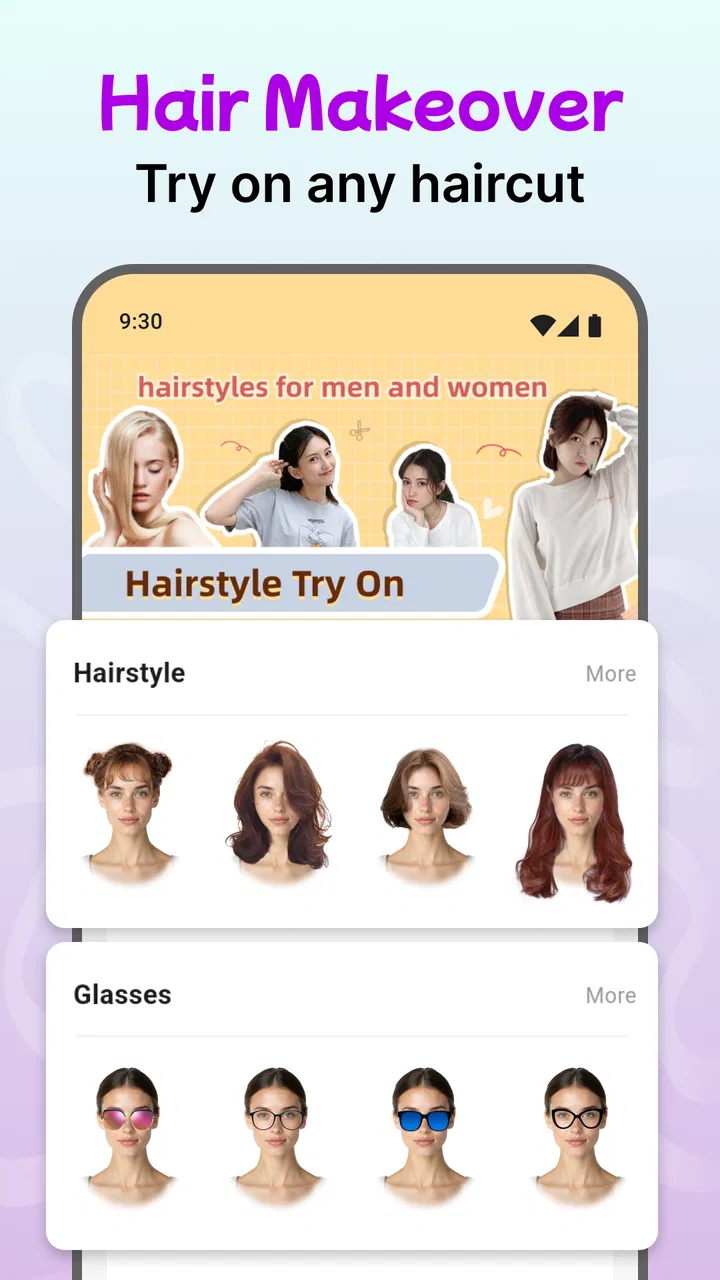
I tried Modiface Haircut: Hair Makeover as a quick visual tool for changing hairstyles, hair colors, glasses, jackets, and even the overall feel of a face. It sits in the beauty category, but I found it more useful as a low-pressure way to explore an idea than as a serious styling consultation. You can experiment with a look before showing it to a friend, save yourself from guessing at a new color, or simply have a laugh with a shared phone.
The app is free to install, which makes it easy to test without committing money at the start. It is made by One Music Player and has built a sizable audience, with over one million installs and an average rating of 4.0 from around twenty-four thousand ratings. Those figures suggest that it has broad appeal, although they should not be mistaken for a guarantee that every hairstyle will look convincing on every face.
How it works when several people share one phone
The most natural household use is passing the phone around. One person can try a short haircut, another can test a different hair color, and someone else can add glasses or a jacket to see how the complete look changes. I liked this because it turns a private style decision into a simple conversation rather than a formal beauty appointment.
You May Also Like

 Pandora - Music & Podcasts
Pandora’s Music Is Easy to Start, but Harder to Recover
Pandora’s strength is its low-effort path from a seed to a station. Its weak spot is how much confidence it asks you to place in connection, setup, and quiet recovery.

 8 Ball Pool
 Is Built on Rivalries, Rematches, and Routine
A close look at the rivalries, rematches, shared routines, and unanswered safety questions that turn a quick pool match into a persistent mobile community.

 Samsung Music
’s Quiet Strength Is Playing What You Already Own
Its reach comes less from spectacle than from dependable access to a personal library. That simplicity is both the app’s strongest retention engine and its ceiling.

 AccuWeather: Weather Radar
AccuWeather Review: A Quick, Clear Forecast for Everyday Decisions
For everyday plans, the best forecast is the one you can understand quickly. AccuWeather makes rain timing, radar, and local conditions easy to act on, with a few trade-offs.

 Hill Climb Racing
Why Hill Climb Racing Still Turns Crashes Into One More Run
A tiny car, a bumpy hill and one more upgrade: Hill Climb Racing keeps resurfacing because its simple chaos makes every near-miss feel personal.

 AliExpress - Shopping App
AliExpress Makes Global Shopping Feel Personal, but Shoppers Bear the Risk
AliExpress turns a global marketplace into a pocket-sized discovery engine. Its reach is useful, its shopping loop compelling, and its trade-offs easy to miss.
More From Our News Desk
View All News


A realistic example is a family getting ready for an event. Someone is unsure whether a darker shade or a shorter cut would suit them, so they take a photo and compare a few options. Another person may use the same session to check whether glasses alter the balance of the face. The app is quick enough for this kind of casual exchange, and the visual result gives people something concrete to discuss.
That shared-device strength also creates a small practical issue: the app is not a replacement for separate personal spaces. If several people use the same phone, the person holding it should be clear about which photo is being edited and whether the next user is comfortable seeing it. I would avoid treating a shared session as an invitation to alter somebody else’s image without asking. The fun works best when everyone involved knows what is being tried.
There is also a useful distinction between entertainment and decision-making. A playful cartoon face can be enjoyable for a group, while a hair-color preview may be used more seriously. I would keep those purposes separate. The cartoon result is better for amusement and conversation; the hairstyle and color tools are more relevant when you are narrowing down an actual look.
Starting with a photo that gives the editor a fair chance
The quality of the preview depends heavily on the starting image. I had better results when the face was easy to see and the hair was not hidden by another object. A clear, front-facing photo makes it easier to judge whether an overlay feels believable. If the picture is dark, angled, or crowded with other faces, the result becomes harder to interpret, and that can make a decent idea look worse than it is.
My practical advice is to begin with one simple image rather than immediately testing every option. First compare the general shape of a haircut, then look at color, and only afterward add glasses or a jacket. This order helps identify what is actually changing. If you apply several effects at once, it becomes difficult to tell whether you like the hair or merely like the complete costume.
Lighting matters too. A warm indoor lamp can make a color appear richer than it would outdoors, while a dim image can flatten the difference between shades. I would use the app to create a shortlist, not to predict the exact result at a salon. The preview is a visual suggestion, and real hair texture, length, and lighting will still affect the final appearance.
Keeping personal boundaries clear on a shared device
Because the app deals with faces and appearance, I think basic courtesy matters more here than it does with an ordinary game. Before editing a partner’s, child’s, or roommate’s photo, ask first. A funny cartoon transformation may seem harmless to one person and embarrassing to another. The app can support a relaxed household activity, but it does not remove the need for consent.
I would also avoid presenting an edited image as if it were a promise. A family member who likes a certain color in the preview may later discover that the real shade behaves differently on their hair. The healthiest conversation is, “This could be worth asking a stylist about,” rather than, “This is exactly how you will look.” That small change in wording keeps expectations realistic.
On a shared phone, it is sensible to review the image before handing the device to someone else. This is not because the app should be treated as suspicious, but because ordinary photo privacy still applies. If a picture is personal, keep the session private and do not assume that everyone in the household wants to see it. Shared use should mean shared access by agreement, not automatic access to every image.
What I found useful in everyday styling decisions
The strongest part of the experience is the ability to compare possibilities without immediately changing your real appearance. That is valuable when you are stuck between familiar and adventurous choices. I could use a conservative hairstyle as a reference point, then move toward a more noticeable option and decide whether the difference felt exciting or simply uncomfortable.
One non-obvious benefit is that the app can help you explain an idea to another person. Saying “I want something shorter around the sides” can lead to different interpretations, while a visual example gives a stylist, friend, or family member a clearer starting point. I would still describe the details in words, but the image can reduce the gap between what you imagine and what another person hears.
Another useful workflow is to compare only one variable at a time. Try the same hairstyle with different colors, or keep the color stable while comparing lengths and shapes. This makes the app more informative than rapidly cycling through random combinations. It also helps when coordinating with someone else, because you can say exactly what you liked: the cut, the shade, the glasses, or the jacket.
The clothing and accessory options add context that a hairstyle alone cannot provide. A hair color may seem too bold in isolation but feel balanced when paired with glasses or a jacket. Conversely, a complete combination can become visually busy. I found it helpful to remove one element at a time when a preview felt wrong. That simple subtraction often showed whether the problem was the hairstyle or the surrounding styling.
Where the cartoon option fits
The cartoon face is the least serious part of the app, but it has a clear role in a shared household. It gives younger users and adults an easy way to experiment without treating the result as a real beauty decision. It can also break the ice when someone feels awkward about trying a new look. A playful image lowers the pressure and makes the first conversation easier.
Still, I would not use the cartoon result to judge whether a haircut will suit someone in real life. Stylized faces simplify proportions, hair texture, and expression. For an actual style choice, I would return to a realistic photo and use the cartoon feature only as entertainment or a creative prompt.
Free access, optional spending, and what to watch for
The app is free, but it includes in-app purchases ranging from less than a dollar to amounts approaching one hundred dollars per item. That range makes it worth paying attention when the app is used by several people, especially if a child has access to the device. I would make the spending boundary clear before handing the phone over and would not assume that “free” means every option will remain free.
This is particularly important in a household where one person owns the device and another person explores the app. Agree in advance about whether anyone may buy an item, and who would be responsible if an accidental purchase happens. The app can be enjoyable without turning a casual styling session into an unexpected expense, but that requires a little coordination.
I also think the purchase structure affects who should use it. If you only want to test a few basic ideas, the free starting point may be enough to decide whether the experience suits you. If you are looking for a large, unrestricted styling library, you should approach the optional purchases carefully rather than unlocking things impulsively. I prefer using the free experience first and deciding later whether the extra content genuinely improves the result.
Age, trust, and realistic expectations
The content rating is Everyone, which fits the app’s general focus on appearance, accessories, and cartoon-style editing. That does not mean every household can ignore supervision. Age-appropriate use still depends on the child, the device, and the family’s rules about photos and spending. A younger user may need help understanding that an edited hairstyle is an idea, not a guaranteed preview.
For children, I would keep the activity collaborative at first. Let them choose a hairstyle or color, then talk about what they like and why. This turns the app into a creative exercise instead of a tool for judging faces. It is also a good way to notice whether a child is using the app playfully or becoming overly focused on changing their appearance.
Teenagers may prefer more independence, but the same trust principle applies. If the phone is shared, they should know who can view the images. If purchases are possible, the household should have a clear agreement. The app itself does not replace those conversations, and I would not present it as a private, fully separated space for every member of a family.
Adults should be equally careful with expectations. A preview can help someone communicate a preference, but it cannot account perfectly for hair density, curls, growth patterns, facial movement, or the way a real stylist adapts a cut. I would take a promising result to a professional as a discussion aid, not as an instruction that must be copied exactly.
How it compares with ordinary alternatives
Compared with searching through hairstyle photos online, this app feels more personal because the look is placed on your own face. Online galleries are often better for discovering professional references and seeing how a style behaves on different hair types, while this tool is better for quickly asking, “Could I imagine myself wearing this?” I would use both: the app for first-pass experimentation, then real photos and professional advice for confirmation.
Compared with visiting a salon immediately, it is cheaper and less intimidating for early exploration. You can reject an idea in minutes rather than explaining it during an appointment. The trade-off is accuracy. A stylist can assess your actual hair and adapt the cut, while the app can only provide a visual approximation. For a major change, the salon conversation remains the more reliable step.
Compared with a general photo editor, the beauty-focused approach is more convenient for this particular task. You do not need to build the look manually from unrelated editing tools. The trade-off is flexibility: a general editor may offer finer control, while this app is aimed at fast transformations and casual comparison. I would choose this app when speed matters more than detailed retouching.
Device compatibility and practical expectations
The current version is 34.1.4, and the app can run on Android devices using version 5.0 or later. That broad compatibility is useful for households with an older spare phone, although the experience can still vary depending on the device and the quality of its camera. A larger screen may make comparisons more comfortable, while a small or slow phone can make a group session feel cramped.
The app was released on January 12, 2023, and its continued presence alongside a substantial install base gives it the feel of an established casual tool rather than a one-off novelty. I would still judge it by your own workflow. If you need precise professional consultation, detailed hair analysis, or a carefully controlled private workspace, this is not the right category of product. If you want fast visual experimentation, it makes more sense.
One practical question is whether you need an account to coordinate use across people. I would not build a household plan around synchronized profiles or shared histories. Treat the app as something used on the device in front of you, and keep personal images and decisions organized according to your own household habits. That approach avoids assuming boundaries the app may not be designed to provide.
My household verdict
After using it, I see Modiface Haircut: Hair Makeover as a friendly starting point for appearance experiments. Its best use is not proving exactly what a haircut will look like, but helping someone move from a vague idea to a clearer conversation. The hairstyle, color, glasses, and jacket combinations give a shared phone enough variety for a quick family activity, while the cartoon face adds a lighter option for users who are not ready to take the styling side seriously.
I would recommend it to people who want a low-cost way to compare looks, explain a preference to a friend, or make a salon discussion more concrete. I would also recommend setting household rules first: ask before editing someone’s photo, check images before passing the phone along, and agree about optional spending. Those habits make the experience more comfortable without taking away its playful side.
I would skip it if you expect salon-level simulation, exact color matching, or detailed control over every strand and garment. A real stylist, a strong hairstyle gallery, or a more advanced editor may serve those needs better. For everyone else, the free entry point makes it easy to try, and the Everyone rating suits its general tone. The best way to use it is as a conversation starter, not as a final authority on your appearance.
My final recommendation is positive, with sensible limits. One Music Player has made a beauty app that works particularly well in short, shared sessions: choose one photo, change one feature, compare the result, and discuss what feels right. Keep the playful edits separate from serious decisions, protect each person’s comfort, and treat purchases as a household choice. Used that way, it becomes a practical little styling companion rather than just another collection of random filters.
FAQs for Modiface Haircut:Hair Makeover
01What is Modiface Haircut: Hair Makeover and how does it work?
Modiface Haircut: Hair Makeover is a virtual hairstyling app that allows users to try on different hairstyles and colors using augmented reality. By simply uploading a photo or using the live camera feature, users can experiment with various looks before making any real-life changes to their hair.
02Is Modiface Haircut: Hair Makeover free to use?
The app offers a free version that includes basic hairstyles and features. However, for access to a wider variety of advanced styles and premium features, there might be in-app purchases or a subscription fee. It's best to check the app store listing for specific pricing information.
03Can I use Modiface Haircut: Hair Makeover on both Android and iOS devices?
Yes, Modiface Haircut: Hair Makeover is available for both Android and iOS platforms. Users can download the app from the Google Play Store for Android devices or the Apple App Store for iOS devices. Ensure your device meets the app’s compatibility requirements for optimal performance.
04Does Modiface Haircut: Hair Makeover require an internet connection?
While some basic features might work offline, an internet connection is generally required for accessing the full range of hairstyles, updates, and any cloud-based features. An active connection ensures that you can enjoy the latest updates and styles provided by the app.
05How accurate are the hairstyle and color simulations in Modiface Haircut: Hair Makeover?
The app uses advanced augmented reality technology to provide realistic simulations of hairstyles and colors. However, the accuracy can vary based on lighting conditions and the quality of the uploaded photo. Users should consider these factors and use the app as a guideline rather than a definitive preview.
Pros
- Realistic hair color simulation.
- Wide variety of styles available.
- Easy-to-use interface.
- Quick photo processing.
- Regular updates with new features.
Cons
- Limited free options available.
- May require internet connection.
- Occasional app crashes reported.
- In-app purchases can be expensive.
- Not suitable for older devices.

Modiface Haircut:Hair Makeover
Gallery